

Codex · OpenSteps · Free skills
An Easier Way to Code with Codex: The Non-Developer Workflow
I gave up on CheerHub a year ago. With Codex and the free OpenSteps skills, I got through the account setup in about 2 hours — and actually understood what was happening.
The problem it solves
“I changed 12 files.” Okay… but is it done?
Codex does a bunch of work, throws coding lingo at you, and says it’s good to go. OpenSteps gives it instructions for the moments that matter — the big picture, the next step, and whether the work is actually finished — so you can follow along.
Watch on YouTubeInstall in 3 steps
Setup was beyond easy.
1
Open opensteps.ai
Copy the two install commands shown on the site and paste them into Codex. Codex handles the setup for you.
2
Add the routing block
On GitHub, follow the “add the routing block” link, copy that command, and paste it into Codex. This tells Codex when to use OpenSteps on its own.
3
Just talk normally
You don’t have to name a skill. Ask “Where are we?” or “All done?” and Codex picks the right one. You can also call one by name.
Works with Codex, Claude Code, and Gemini CLI. I used Codex in the video.
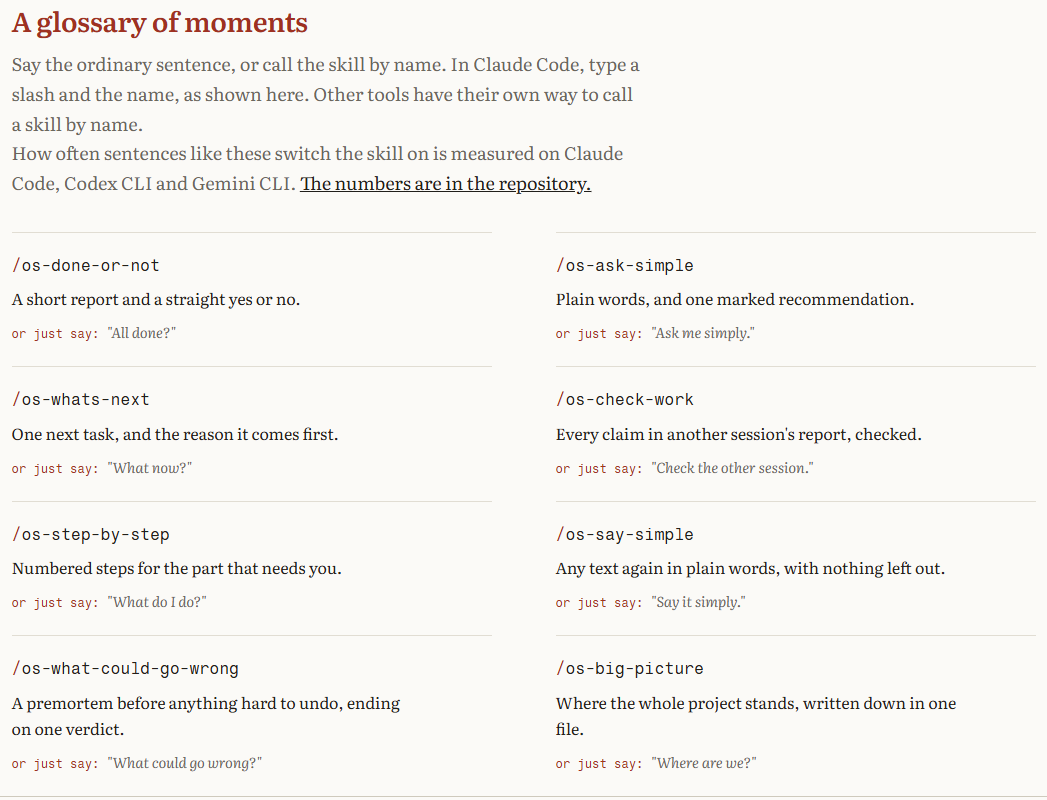
The 8 skills
Just say the normal sentence.
You don’t need to memorize anything. Say the everyday phrase, or call the skill by name (in Claude Code, type a slash and the name).
/os-big-picture
Used in the videoWhere the whole project stands, written down in one file.
Or just say: “Where are we?”
/os-whats-next
Used in the videoOne next task, and the reason it comes first.
Or just say: “What now?”
/os-done-or-not
Used in the videoA short report and a straight yes or no.
Or just say: “All done?”
/os-check-work
Used in the videoEvery claim in another session's report, checked.
Or just say: “Check the other session.”
/os-what-could-go-wrong
Used in the videoA premortem before anything hard to undo, ending on one verdict.
Or just say: “What could go wrong?”
/os-step-by-step
Numbered steps for the part that needs you.
Or just say: “What do I do?”
/os-ask-simple
Plain words, and one marked recommendation.
Or just say: “Ask me simply.”
/os-say-simple
Any text again in plain words, with nothing left out.
Or just say: “Say it simply.”
How I used it on CheerHub
Follow this order on your own project.
1. Get the big picture first
Ask Codex to review the project: what works, what doesn’t, and what to tackle first. Mine found a broken demo link and recommended fixing accounts and team access before anything else.
2. Pick one thing and stay on it
Follow the order it gives you. A plan stops you from jumping to the next shiny problem before the first one is finished.
3. Ask “All done?” before you believe it
“Tests passing” isn’t “finished.” My report said not fully done: the site wasn’t updated, the database still needed changes, and sign-in hadn’t been tested.
4. Test it yourself, for real
Click through it like a user. I found a parent invite that didn’t send and a profile that said “not found” before opening.
5. Explain how your app should work
OpenSteps doesn’t read your mind. Codex assumed only coaches invite parents; I wanted athletes to invite their own parents. Say it plainly.
6. Get a second review, then update the map
Check-work and what-could-go-wrong flagged permission issues. When you stop, run big-picture again so you know what’s tested and what isn’t.
~2 hrs
One night to get accounts working
74
Tests passing at merge, plus build and GitHub checks
1 yr+
How long I’d been stuck on it
Honest note: it wasn’t three magic prompts. There was back and forth, a paused database detour, and more testing. And the rest of CheerHub is still marked untested. Want proof of life? Sign up at cheerhub.pro and try the account setup.
Copy-and-paste prompts
Use these in Codex.
Start a session
Review this project. Tell me what's working, what isn't, and recommend what I should tackle first. Explain it in plain words — I'm not a developer.
Before you believe it's finished
All done? Give me a straight yes or no, and list anything that still has to happen before I can actually use this — like publishing, database changes, or testing sign-in.
Before a risky change
What could go wrong? Check who can see what, especially if one person has more than one role, and give me one verdict before we go further.
When you stop for the day
Where are we? Update the project map: what's tested and finished, what's untested, and the follow-ups I shouldn't forget.
Free OpenSteps + Codex checklist
Install steps and the questions to ask every session.
FAQ
Got a project you gave up on?
OpenSteps is free. Maybe it’s worth coming back to.
Sponsored by OpenSteps. Opinions are my own.
More from Chad
Keep exploring
- Visit page
AI Agent Shopping & x401 Explained
Verified identity, narrow spending permissions, and what to check before an AI buys for you.
- Visit page
Claude Code vs. ChatGPT Codex
My same-project $20 usage comparison and daily-driver workflow.
- Visit page
Google SynthID Detector Guide
Check Google's AI watermark and understand why ‘not detected’ does not mean real.