YouTube Tools, Reviewed Honestly
Is vidIQ worth it? Here's my honest answer.
I run a YouTube channel and I pay for this thing. So instead of a feature list, here's what each plan costs, what it actually changed for me, and the simple test I use to decide whether any subscription earns its spot.
Want to try it yourself? Start with the free vidIQ plan here (affiliate link).
I may earn a commission if you upgrade through this link — at no extra cost to you.
The short answer
Free: yes. Boost: only if you post weekly. Coaching: only if you want 1-on-1 help.
vidIQ is a research tool, not a growth button. It tells you what people are searching for, what your competitors are ranking for, and whether your title is pulling its weight. That's genuinely useful — but only if you're publishing often enough to use the information.
If you upload twice a year, the free plan is all you need. If you're uploading a couple times a month and still guessing at topics, the $16.58 Boost plan pays for itself the first time it stops you from making a video nobody searches for.
Proof
This is my actual vidIQ dashboard.
I'm on the Boost plan. Here's what I see when I open it — subscriber and view goals up top, then the Niche Outliers feed showing videos in my space that massively outperformed their channel's average. The multiplier badges (8.8x, 5.4x, 20x) are the part I actually use: they tell me which topics are over-delivering right now.
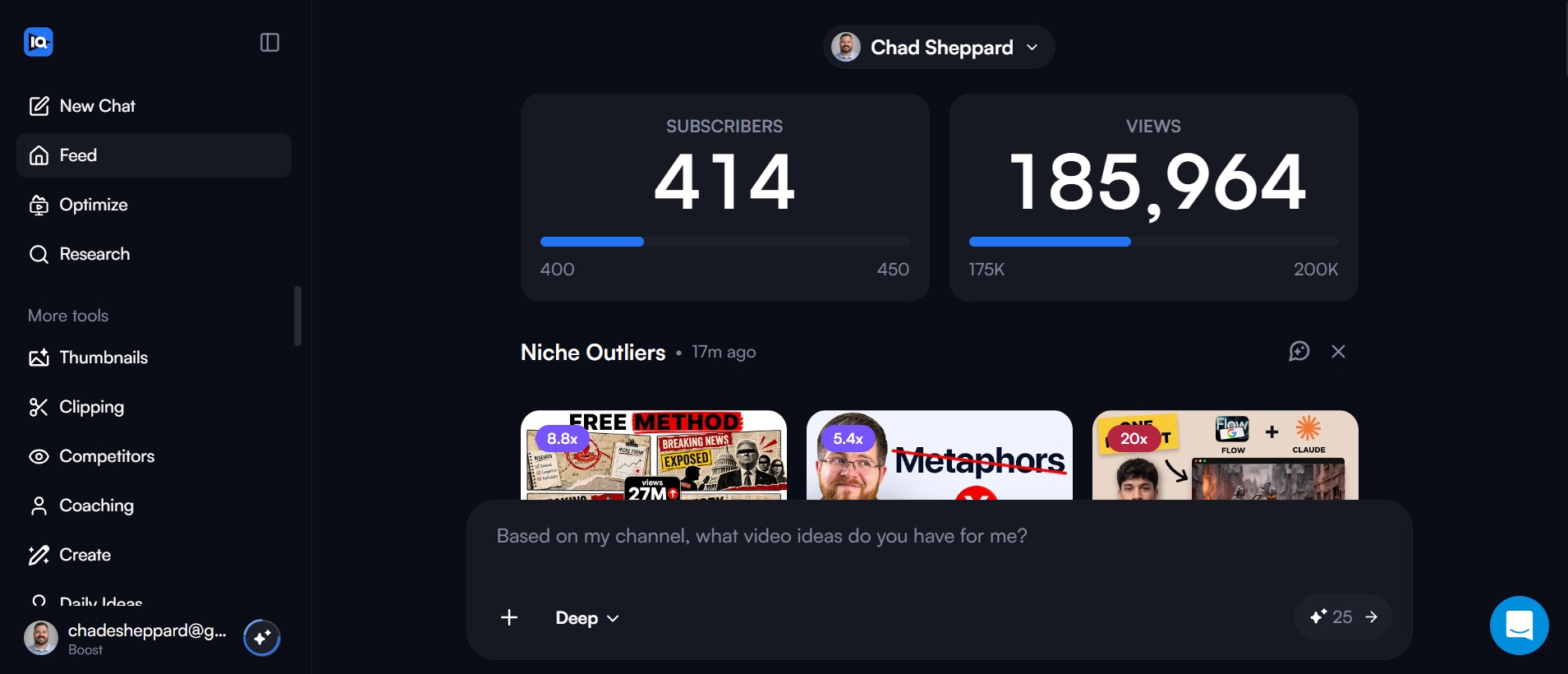
Niche Outliers
Videos in my niche beating their channel average — the fastest topic signal I get.
Goal tracking
Subscriber and view bars that keep me honest without opening YouTube Studio.
The AI chat
"Based on my channel, what video ideas do you have for me?" — decent starting points, not final answers.
How I actually use it
My real vidIQ workflow before I make a video.
The dashboard screenshot above is the evidence I can show. The bigger question is what I do with that information. This is the repeatable process that makes Boost useful on my channel — and the specific decision each feature helps me make.
| Step | What I check | What changes |
|---|---|---|
| 1. Find a topic | Niche Outliers and their 5x, 10x, or 20x performance badges | I start with topics already outperforming a channel's normal views instead of a blank page. |
| 2. Check demand | Related phrases, search-volume estimates, and competition scores | I change the angle or wording before filming if the original phrase shows little demand. |
| 3. Compare titles | The exact language used by videos already winning on that topic | I write a clearer title around the viewer's question instead of describing the tool generically. |
| 4. Sanity-check the idea | Whether the topic fits my channel and gives me something useful to add | I skip ideas that score well but would still make a boring or off-topic video. |
The growth impact I can honestly claim
vidIQ has made my topic selection faster and less random. It has not given me a guaranteed percentage lift, and I would not trust a review that promises one. Its value is avoiding weak ideas earlier, before I spend hours recording and editing.
How I decide
The one-hour rule.
Every subscription I pay for has to save me at least one hour a month. That's it. An hour of my time is worth more than $16.58, so if a tool clears that bar it stays. If I open it twice and forget it exists, it goes.
Where vidIQ saves me time
Where it doesn't
Pricing
What vidIQ actually costs.
Prices shift with promos and annual billing, so treat these as ballpark. The important part is which tier matches how often you publish.
| Plan | Ballpark price | Who it's for | What you get |
|---|---|---|---|
| Free | $0 | Anyone starting a channel | 150 AI credits every month, niche trends, fresh content ideas, personalized growth tips from AI Coach |
| Boost | $16.58/mo | Posting weekly and chasing growth | 2,000 AI credits monthly, click-worthy thumbnails, unlimited trends research, optimization tools, unlimited subscriber insights |
| Coaching | $319.17/mo | Full-time creators who want 1-on-1 help | 6,000 AI credits, 1-on-1 guidance, custom growth plan, recurring live calls, access to your actual YouTube Analytics |
My advice: start free, upgrade only when free annoys you.
Install the free extension and use it for two weeks. If you keep bumping into a locked number you actually wanted, that's your signal to pay. If you don't, you just saved ~$200 a year.
Get the free vidIQ plan (affiliate)What I like
What I don't
What vidIQ is like on a small channel
Most vidIQ reviews are written by people with six-figure subscriber counts. I'm not one of them. My channel is still under 1,000 subscribers with around 85 videos published, so everything on this page is what the tool feels like at that size.
Where it earns the money
Picking topics before I film. Seeing which phrasing of an idea already gets searched saves me from making videos nobody was looking for — that's the single change that moved my views the most.
Where it doesn't
Scores and search-volume estimates get treated like facts by a lot of creators. They're directional. A green score on a boring video still gets you a boring video.
How long before you can judge it
Give it about six uploads. That's enough to see whether researched topics outperform the ones you picked on instinct. If they don't, cancel — nothing about the paid plan changes that answer.
The verdict
Worth it for some people. Not for everyone.
It's worth paying for if…
- You publish at least twice a month — the tool needs data to be useful
- You've been guessing at titles and tags and want a second opinion
- You research what's working on other channels before you film
- You'd rather spend $16.58 than an hour a month digging through YouTube Studio
Stick with free if…
- You post once every few months — free tier is plenty
- You want views without making better videos (no tool does that)
- You already do keyword research somewhere else and it's working
- You're expecting the Boost plan to grow the channel for you
My take
vidIQ earns its keep on my channel because I publish regularly and I hate guessing. The keyword scores stop me from filming a topic nobody searches, and the competitor feed tells me what's landing this week. That's easily an hour a month. But I want to be clear: it did not grow my channel — better videos did. vidIQ just made me pick better topics to make videos about.
The comparison everyone asks about
vidIQ vs. TubeBuddy — which is actually worth it?
I've run both. They're closer than either company's marketing wants you to believe — both overlay keyword data on YouTube, both have free tiers, both nudge you toward a paid plan. The honest difference is in what they do best.
Pick vidIQ if you want…
Pick TubeBuddy if you want…
My advice: install both free tiers for a week and keep the one you actually open. For me that was vidIQ — the idea feed is the thing I use every time I sit down to plan a video.
Questions people actually ask
vidIQ FAQ.
Is vidIQ worth it?
For most creators, the free tier is worth installing today and the $16.58/month Boost plan is worth it once you're publishing at least twice a month. The higher Coaching tier is only worth it if you want direct 1-on-1 guidance. If a plan doesn't save you an hour a month, cancel it.
Is vidIQ free?
Yes. vidIQ has a permanent free plan that includes the browser extension, basic keyword scores, and a channel audit. You don't need a paid plan to get value out of it.
Is vidIQ safe to use?
Yes. vidIQ is an official YouTube-approved partner and connects through Google's standard permission screen. You can revoke its access anytime from your Google account security settings.
Is vidIQ accurate?
Its keyword scores and search volume are estimates built from public data and modeling, not numbers pulled directly from YouTube. They're reliable for comparing one keyword against another, less reliable as exact traffic predictions.
Does vidIQ actually work?
It works as a research and feedback tool — it tells you what people search for and what competitors are doing. It does not push views to your videos. Growth still comes from the video itself; vidIQ just stops you guessing about the topic and title.
Is vidIQ better than TubeBuddy?
They're close. vidIQ has a cleaner interface and a stronger free tier and idea feed. TubeBuddy has better bulk-editing and A/B thumbnail testing. Most creators only need one — try both free tiers for a week and keep the one you actually open.
More honest tool reviews on YouTube.
New videos every week — no theory, no hype, just what actually works for everyday people.
Behind the video
The gear I use to make these.
Everything here is sitting in my office right now. If you buy through an Amazon link, I earn a small commission — it helps the channel, and costs you nothing extra.
Sony Alpha a5000
Compact mirrorless camera for talking-head videos.
View on Amazon →Elgato Facecam
Dedicated webcam when I don't want to rig the mirrorless.
View on Amazon →Elgato Key Light
Bright, dimmable, computer-controlled key light.
View on Amazon →Elgato Stream Deck +
One-press control for lights, scenes, and apps.
View on Amazon →Elgato Wave:3 Mic
Clean mic for voiceovers and screen recordings.
View on Amazon →DJI Mic Mini
Wireless lav mic for away-from-desk shots.
View on Amazon →Elgato Prompter
Built-in screen so I can read while looking at the lens.
View on Amazon →Meross Smart Plug
Reliable HomeKit smart plugs for fans and lamps.
View on Amazon →Govee Smart Bulbs
Color Wi-Fi bulbs with app and voice control.
View on Amazon →EMART Umbrella Lights
Budget-friendly fill lights for even coverage.
View on Amazon →Amazon Associates disclosure: I earn from qualifying purchases. I only list gear I own and use.
More from Chad