
iPhone Shortcuts Playbook
Connect your speaker. Start your song.
Make your iPhone open YouTube Music, set the volume, and load a favorite song whenever your Bluetooth speaker connects.
Watch the Short
The whole idea in under a minute.
The video shows the result. This playbook gives you every tap, the exact action order, and the fixes if iOS gets in the way.
The finished shortcut
Four actions, one automatic routine.
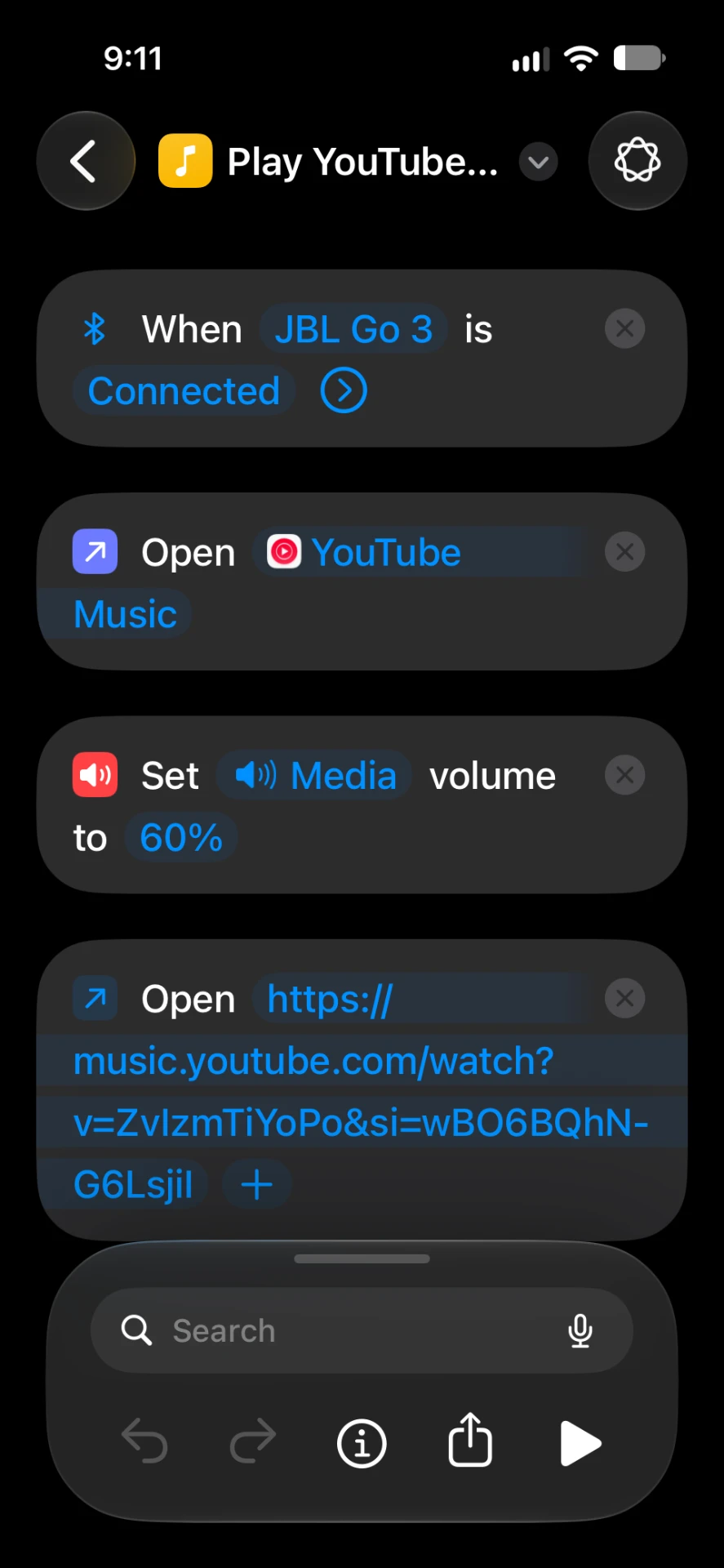
My version watches for the JBL Go 3, opens YouTube Music, sets media volume to 60%, and opens one specific song link. Your speaker, volume, app, and music can all be different.
Apple Shortcuts
Already on iPhone
JBL Go 3
My trigger device
The speaker in the video
Get yourself a JBL Go.
This is the speaker I use with the automation. It is tiny, waterproof, and plenty loud for a desk, a shower, or a campsite. Any Bluetooth speaker works, but if you want the same setup as the video, this is the one.
View the JBL Go on AmazonAmazon affiliate link: I earn a small commission if you buy through it, at no extra cost to you.
The recipe
Connect → open → set volume → play.
- 1Bluetooth connects
- 2Open music app
- 3Set media volume
- 4Open song link
One-time setup
Build it step by step.
Step 01
Choose the Bluetooth trigger
Open Shortcuts, tap Automation, then + and Create Personal Automation. Choose Bluetooth, tap Device, and select the speaker that should trigger the music. My example uses a JBL Go 3.
Step 02
Make it run automatically
Choose Is Connected, then select Run Immediately if your iPhone offers it. Turn off Notify When Run if you do not want a notification every time the speaker connects.
Step 03
Open your music app
Add the Open App action and choose YouTube Music. This brings the right app forward before the shortcut opens the song link.
Step 04
Set a safe starting volume
Add Set Volume, tap the percentage, and choose your starting level. I use 60%. Start lower if the speaker is powerful or you are testing indoors.
Step 05
Paste the exact song link
In YouTube Music, open the song, tap Share, and copy its link. Back in Shortcuts, add Open URLs and paste that link. This is what sends the automation to your chosen track.
Step 06
Test it from a fresh connection
Tap Done, disconnect the speaker, then connect it again. Your iPhone should open YouTube Music, set the media volume, and open the song you selected.
Before you test
Check these six things.
- Bluetooth is on and the speaker is already paired
- The trigger says Is Connected, not Is Disconnected
- Open App points to your music app
- Set Volume uses a comfortable level
- Open URLs contains the song’s share link
- Run Immediately is selected when available
Make it yours
One trigger, plenty of options.
Automatic does not always mean instant playback.
The shortcut can open your music app, adjust volume, and load a link. iOS or the music service may still require you to unlock the phone or tap Play. Test your exact setup before relying on it in the car.
Troubleshooting
If the automation does not work.
FAQ
Bluetooth automation questions.
More useful iPhone automations.
Simple setups for everyday tech—shown quickly, then explained step by step.
Behind the video
The gear I use to make these.
Everything here is sitting in my office right now. If you buy through an Amazon link, I earn a small commission — it helps the channel, and costs you nothing extra.
Sony Alpha a5000
Compact mirrorless camera for talking-head videos.
View on Amazon →Elgato Facecam
Dedicated webcam when I don't want to rig the mirrorless.
View on Amazon →Elgato Key Light
Bright, dimmable, computer-controlled key light.
View on Amazon →Elgato Stream Deck +
One-press control for lights, scenes, and apps.
View on Amazon →Elgato Wave:3 Mic
Clean mic for voiceovers and screen recordings.
View on Amazon →DJI Mic Mini
Wireless lav mic for away-from-desk shots.
View on Amazon →Elgato Prompter
Built-in screen so I can read while looking at the lens.
View on Amazon →Meross Smart Plug
Reliable HomeKit smart plugs for fans and lamps.
View on Amazon →Govee Smart Bulbs
Color Wi-Fi bulbs with app and voice control.
View on Amazon →EMART Umbrella Lights
Budget-friendly fill lights for even coverage.
View on Amazon →Amazon Associates disclosure: I earn from qualifying purchases. I only list gear I own and use.
More from Chad
Keep exploring
- Visit page
Siri AI Beta — 5 Real Tests
Five first-try tests of the iOS 27 Siri AI beta, with a final report card.
- Visit page
Siri AI Waitlist (iOS 27)
Where the Siri AI sign-up hides in Settings and what keeps the button from showing up.
- Visit page
Home Assistant + Stream Deck Setup
Control every light, lamp and fan from your Stream Deck — free plugin, no coding.